How to Block a Member in Ostana
Last updated: June 14, 2025
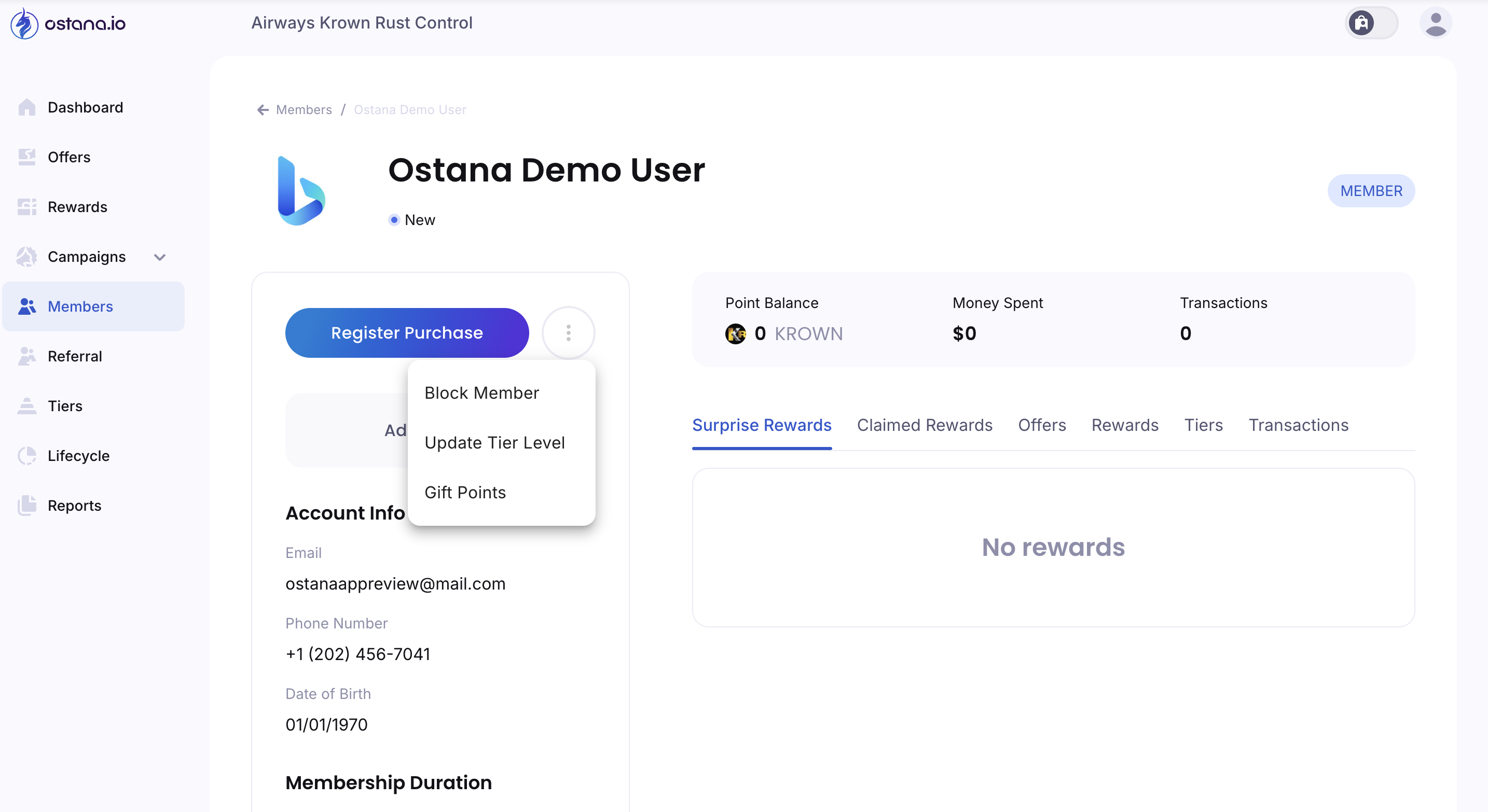
Blocking a member in Ostana prevents them from earning or redeeming points, accessing offers, and participating in your loyalty program. This feature is useful for handling abuse, duplicate profiles, or account misuse.
✅ Step-by-Step: Block a Member
1. Go to the Members Tab
Click Members from the sidebar menu.
2. Open the Member’s Profile
Find the member you want to block and click their name to open their profile page.
3. Click the Three-Dot Actions Menu
Located next to the Register Purchase button in the top section.
4. Select Block Member
Click Block Member from the dropdown options. A confirmation dialog will appear.
5. Confirm the Action
Click Confirm to complete the block action.
⛔ What Happens When a Member is Blocked?
The member can no longer:
Earn points
Redeem rewards
Receive offers
Their membership status will show as "Blocked"
Their account remains in the system but cannot engage further
Blocking should be used carefully and only when absolutely necessary to maintain program integrity or compliance.