How to Calculate Points Needed for a Reward
Last updated: June 20, 2025
Setting the right number of points for each reward is key to a successful loyalty program on Ostana. This Knowledge Base walks you through how to:
Calculate how many points a reward should cost
Understand the value of each point
Maintain a profitable earn/redeem structure
🎯 Objective
Your goal is to define how many loyalty points a customer needs to redeem in exchange for a reward (e.g., $5 off, free product, etc.) — without hurting your margins.
🔢 Step 1: Understand the Core Formula
The basic formula used to set reward point cost is:
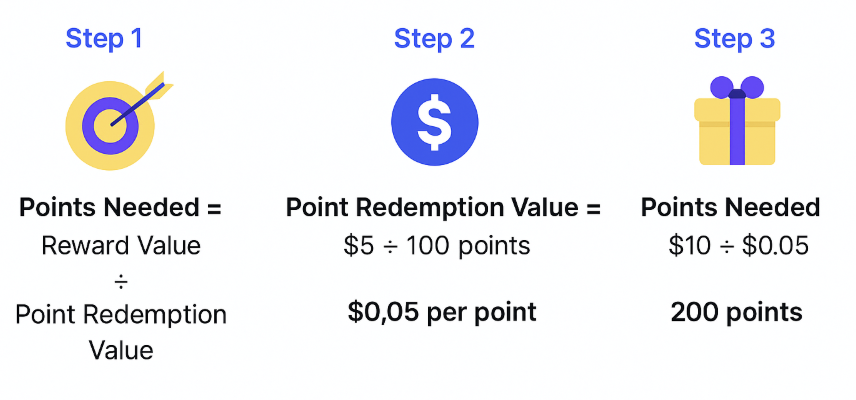
Points Needed = Reward Value ÷ Point Redemption Value
🧮 Step 2: Calculate the Point Redemption Value
Point Redemption Value = The dollar value of 1 loyalty point when redeemed.
This is not automatically fixed — you determine this value based on your:
Profit margin on products
Average transaction value
Customer loyalty behavior
Desired ROI from loyalty redemptions
👇 Example Calculation
Let’s say:
Your average margin on a product = 50%
You want to offer a $10 reward
To stay profitable, you want that $10 reward to only cost you $5
So, let’s assume:
Customers earn 10 points per $1 spent (i.e., 100 points for $10 spent)
To protect your margins, you want every 100 points to equal $5 max, not $10.
That means:
Point Redemption Value = $5 ÷ 100 pts = $0.05 per point
You now know that 1 point is worth $0.05 when redeemed. This ensures you’re giving away value within your profit buffer.
📊 Step 3: Calculate the Points Needed for a Reward
Use your redemption value from Step 2 in this formula:
Points Needed = Reward Value ÷ Point Redemption Value
For example:
Reward Value = $10
Redemption Value = $0.05
Points Needed = $10 ÷ $0.05 = 200 points
So, customers need 200 points to redeem that reward.
🛠 Step 4: Set Up the Reward in Ostana
Go to the Rewards tab in your Ostana dashboard
Click Create Reward
Fill out:
Reward Name (e.g., "$10 Off")
Points Required (e.g., 200)
Description (e.g., "Valid on all purchases over $25")
Image (optional but recommended)
Availability Rules (e.g., only for Gold members, expires in 30 days)
Click Save & Publish
💡 Best Practice Tips
Tip | Why It Matters |
🔁 Align Earn & Burn Rates | Prevent customers from gaming the system |
📈 Set points that reflect margins | Ensure your rewards don’t eat into profit |
🎯 Round point values | Make 200 points feel better than 187 |
🧱 Tier rewards | Offer $5, $10, and $20 rewards for better UX |
⏳ Add expiry dates | Increase urgency to redeem |
🧑🤝🧑 Segment rewards by tiers | Only offer premium rewards to your most loyal members |
🧠 Example Matrix
Reward Type | Reward Value | Redemption Value | Points Needed | Notes |
$5 Off Coupon | $5 | $0.05 | 100 pts | Good entry-level reward |
Free Coffee | $3.50 | $0.05 | 70 pts | Small but meaningful |
$20 Gift Card | $20 | $0.04 | 500 pts | Reward for loyal spenders |
Free T-Shirt | $25 | $0.05 | 500 pts | Use as surprise reward |
📤 Optional: Add Redemption Rules
In the reward setup screen in Ostana, you can:
Set min spend requirement (e.g., only redeemable on purchases over $25)
Restrict to specific tiers (e.g., Gold or VIP)
Set usage limits (once per customer)
Add expiration windows (e.g., valid 30 days)
🔍 FAQs
❓How do I know my reward is profitable?
Use this rule of thumb:
Total Points Required × Point Redemption Value < Product Cost
If you’re giving away a $10 item, make sure the cost to you is covered after the customer earns and redeems points.
❓Can I change the point redemption value later?
Yes, but only if you're on the Elite Plan. On Starter or Pro, the redemption value is fixed to the Ostana default (usually 10:1 ratio).
❓Can customers redeem part of a reward?
No. Rewards in Ostana are redeemed in full once the customer has enough points.
❓Where do I check how often rewards are redeemed?
Navigate to:
Reports → Reward Summary Report
This will show redemption rates, points used, and reward popularity.
✅ Summary
Calculate your point redemption value based on margins
Use the formula: Reward Value ÷ Point Redemption Value = Points Needed
Set up rewards with clear descriptions and visuals
Monitor redemptions and adjust if customers are redeeming too fast or too little